


How to get Cortana working in new languages in Windows 10 (build 10041)

For those of us outside of the Unites States, it can be a tricky process to gain access to Cortana, the digital assistant in Windows 10. If you installed an English (US) version of Windows 10 Technical Preview Build 9926, then updated to Build 10041 you may notice that Cortana is no longer available or stopped working. This likely occurred if you change the Regional Settings in build 9926.
Read on to find out how to get Cortana working in one of the newly added languages (Note: This is limited to Chinese, English (UK), German, French, Italian, and Spanish for now, more languages will follow)
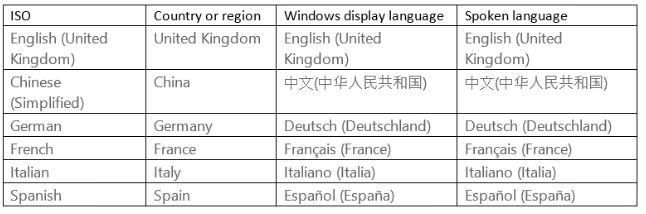
Check the following settings and may sure they are all aligned to the same languages and/or region:
1. Go to Settings > Time & Language > Region & Language
Check the Country or region setting
Check the Windows display language (set as default) setting, download any keyboard or languages as appropriate.
2. Then go to Settings > System > Speech
Check the Spoken language setting, Download the language as appropriate.
Comments